
- 1Photo
- 2Create
- 3Video
You and a friend. The viral tiptoe dance.
Use one photo to play the dancer or onlooker. Add a friend with a second photo—same price, template soundtrack included.
Made with this tool
Sample result with AI-created portraits. Faces and movement can vary.
Step 1 of 3
Make this video yours
Choose a photo, then the character you want to replace.
Upload your photo
Photo tips & privacy
Choose a clear, well-lit photo of one person. Phone photos (including HEIC), JPG, PNG, WebP, AVIF and BMP are supported up to 20 MB and 64 megapixels. We automatically resize and convert them. Any gender; the same photo can be used for both roles.
Photos and results are private and expire after 24 hours. You can delete completed work below. A local draft lasts up to 30 minutes; selected photos are sent to the generation provider when you submit.
$9.90 / video
One-time payment
Checking availability…
From two photos to a generated video
Two photos, two roles: one for the dancer and one for the onlooker. Watch the video they produced below. Both portraits are AI-created adult characters.
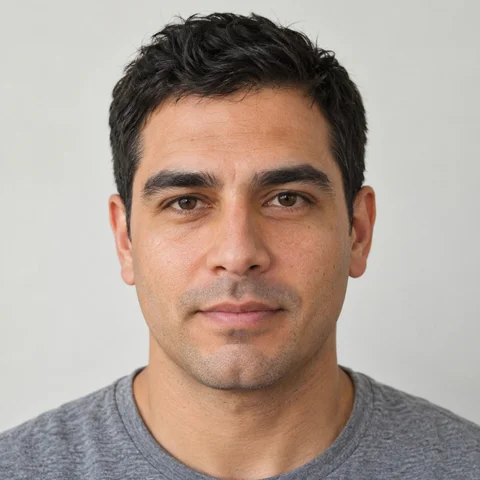
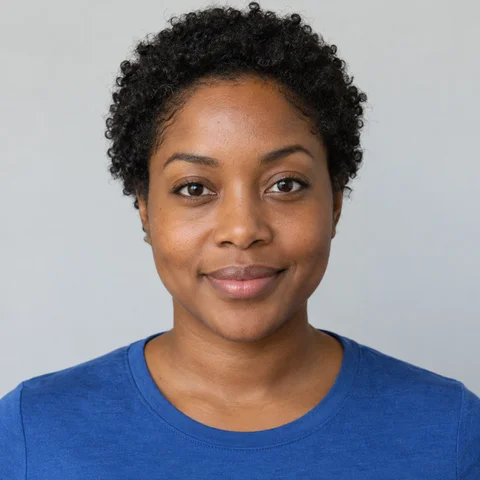
Actual generated result · Original soundtrack
- Created 2026-10-09
- This video took 246 seconds
- 12 seconds · 854 × 480 · MP4
In this video, a brief close-up shows the other character’s face, and a gesture differs from the template. Faces and movement can vary between generations, as can the time to finish.
The classic viral scene
The familiar shush, reaction, and tiptoe dance. Press play to revisit the scene.
The shush and reaction
What Is Rumpelstiltskin AI?
Rumpelstiltskin AI is the name commonly used for a fairy-tale-style AI video: a small character shushes and dances on tiptoe while a nearby woman reacts. With this independent video generator, you can personalize either character or both using your photos.
Meme BackgroundMake the shushing tiptoe meme with your own photos
Use RumpelstiltskinAI Video to cast yourself and a friend in the Rumpelstiltskin shushing, tiptoe dance meme. Upload two separate portraits: one person dances and the other reacts. Making it solo? Upload one photo and choose either role. The reference clip and instructions are already provided; no prompt or dance-video upload is needed.
USD 9.90 for a 100-credit starter pack: enough for one generation, with one character or both. One-time payment, no subscription and no separate MP4 download fee.
You get a 12-second, landscape 16:9, 480P MP4. Watch the real input-and-result examples before paying: this is AI scene recreation, so facial likeness and unselected details can vary. For TikTok or Reels, place the clip on a portrait canvas to keep both characters visible; native vertical and HD output are not available.
Compare workflows and output optionsHow to Make a Rumpelstiltskin AI Video
- 01
Choose either character—or both
Upload a clear photo for the dancer, the reacting character, or both. You can start with the second slot. Move a single photo or swap two photos before submitting.
- 02
Review the details and cost
Review your photos, roles and cost, then sign in. If needed, pay once through Stripe and return to start your video.
- 03
Preview, then download MP4
Follow your task, preview your finished video and download the MP4 at no extra charge. Confirmed technical failures return the credits used for that task.
Video Generator at a Glance
Everything you need to know about your personalized video: photos, format, cost and delivery.
- Photo input
- 1–2 photos · JPG, PNG, WebP, HEIC/HEIF, AVIF or BMP · up to 20 MB and 64 megapixels each · at least 240 px per side · automatically resized
- Characters
- Dancer only, reacting character only, or both. At least one photo is required.
- Replacement goal
- Personalize the selected facial identities in the template scene. The model is instructed to retain the costumes, choreography, camera sequence and any unselected actor; AI details can vary.
- Reference clip
- 12 seconds · 854 × 486 · landscape · original soundtrack
- Video format
- 12-second MP4 · 16:9 · 480P · original soundtrack
- Generation cost
- 100 credits per video. Credits are deducted when your task is queued; confirmed technical failures return those credits.
- Generation time
- Allow approximately 4–5 minutes for generation. Queueing and provider load can make it longer; follow progress in your account.
- Failed tasks
- Deducted credits are restored once after failure is confirmed. A retry is a new task with its own displayed cost.
- File retention
- Private photos and results expire after 24 hours and are removed by scheduled cleanup. Browser drafts last up to 30 minutes. Generation providers process submitted photos under their own retention policies.
Choose a Photo That Works
Use one clearly visible face, even lighting and a sharp image. Avoid group photos, heavy filters and covered faces. Role labels identify positions in the template, not the gender of the person you upload. The photo supplies facial identity; it is not a request to copy the person’s outfit or body.
Rumpelstiltskin AI: Common Questions
What is the little man doing the shush and tiptoe dance?
The fairy-tale-style clip with a little man shushing and dancing in a straw-filled room while a woman watches is commonly called the Rumpelstiltskin AI meme. This independent generator lets you use your photos to play the dancer, the onlooker or both.
How do I make the Rumpelstiltskin dance video with my own face?
Choose Dancer and upload one clear photo of yourself. Leave the other role empty to request the original onlooker. Sign in, buy a one-time credit pack and confirm generation. You can preview and download the finished MP4 with the original soundtrack; no prompt writing or editing is needed.
Can I replace only the woman watching him dance?
Yes. Choose Onlooker, upload your photo and leave Dancer empty. The model is instructed to retain the original dancer while replacing the reacting character. Any gender can play either role; faces and other AI-generated details can vary.
What happens if I leave a photo slot empty?
The model is instructed to retain the original template actor for an empty slot. AI details can vary. Add a photo to at least one slot to generate a video.
Can the same photo play both characters?
Yes. Select the same photo in both slots to use it for both characters. Facial likeness can vary between roles and shots.
Does this change the background or the characters?
The goal is character identity replacement in one fixed template. It keeps the template scene and costumes; it does not offer a background editor or free-form prompt input.
Is the generator free?
Watching the template and choosing photos are free. Video generation uses credits purchased through Stripe. Review the current packs on the pricing page before checkout.
See current credit packsDoes the download include the original meme music?
The MP4 includes the audio from this site’s reference clip. Play the reference with sound before buying: different TikTok and Reels edits can use different songs, so the included track may not be the version you heard. The reference also guides the dance and scene; AI-generated faces and movement can vary.
Can I get a vertical, 720p or 1080p video for TikTok or Reels?
This template exports a 12-second, landscape 16:9, 480P MP4 with the original soundtrack. It has no vertical, 720p or 1080p option. For a vertical post, place the downloaded video on a portrait canvas in your editor; cropping can cut out one of the characters.
See output and posting detailsHow long does generation take?
Allow approximately 4–5 minutes. Queueing and provider load can make it longer. You can return to the same account to check progress and download your video.
What happens if generation fails?
Confirmed technical failures return the credits used for that task. The task shows the credits as returned once restoration is complete. Retrying starts a new task at the displayed credit cost.
Read the result and refund policyHow long are my photos stored?
Uploaded private photos and results expire after 24 hours and are removed by scheduled cleanup. Browser drafts last up to 30 minutes. Submitted photos are processed by the generation provider under its own retention policies.
Did this website create the original viral video?
No. This is an independent video generator. The first-screen example was generated with this tool using fictional portraits; the classic-scene section shows reference footage. Our background guide includes source links.
Can I make this meme on my phone without an app or editing skills?
Yes. Use the website in your phone browser, choose one or two photos and assign the characters. No editing software or prompt writing is required. The result is a landscape 16:9 MP4; this template does not offer a vertical version.
I only want one video. Do I need a subscription?
No. Buy a one-time credit pack through Stripe. Each generation costs 100 credits, and downloading a successful result has no separate fee. Check the pricing page for current pack prices.
Can I make the shushing tiptoe meme with me and a friend?
Yes. Upload two separate portraits: Photo 1 is the dancer and Photo 2 is the reacting friend. Use Swap Roles before submitting if needed. Both people appear in the same 12-second clip. Two characters cost the same 100 credits as one; there is no extra charge for the second person.
See how to assign both rolesCan I see a real photo-to-video example before paying?
Yes. The homepage shows two AI-created adult portraits beside the actual video generated from them. The onlooker-only example shows a separate single-role result. These examples are free to watch; generating a personalized video with your own photo requires paid credits.
See the onlooker-only resultDo I need to find the original video or write a prompt?
No. The shushing tiptoe reference clip and role instructions are built in. Bring one or two clear portraits and choose who dances and who reacts. You do not need a full-body photo, a video of yourself dancing or editing software. Custom reference videos and prompts are not supported.
See how to assign both rolesWill the face look exactly like my photo? What if it does not?
Exact likeness is not guaranteed. This is AI video generation, so faces, expressions and gestures can change across shots, including an unselected character. Compare the published input photos and results first. Appearance differences alone do not automatically return credits; confirmed technical failures do. Contact support with the task ID for a problem with your result.
Read the result and refund policyCan I use a selfie, an iPhone HEIC photo or a group photo?
Use a clear selfie or portrait with one visible face for each role. iPhone HEIC/HEIF photos are supported and converted automatically, along with JPG, PNG, WebP, AVIF and BMP. Each file must be at most 20 MB and 64 megapixels, with each side at least 240 pixels. For two people, use separate portraits instead of a group photo.
Check photo requirements and upload helpMake the Tiptoe Meme Your Own
Choose your characters, upload your photos and bring your own version of the tiptoe dance to life.
Maintained by RumpelstiltskinAI Video · Updated October 14, 2026